What to Look for in a CTR Manipulation Tool for High-Volume Bot Traffic
Scaling bot traffic to hundreds of daily visits turns verification into the hardest part of the job. Without per-visit proof, you cannot tell a completed click from a failed proxy handoff, and clients notice missing evidence before they notice rankings.
This article breaks down what separates a capable high-volume tool from a thin one: proof at scale, campaign capacity and credit efficiency, failure handling, and coverage across Google, Bing, Maps and AI Overviews. You will finish with a clear checklist for evaluating CTRTool or any alternative.
What Is CTRTool and What Does It Do?
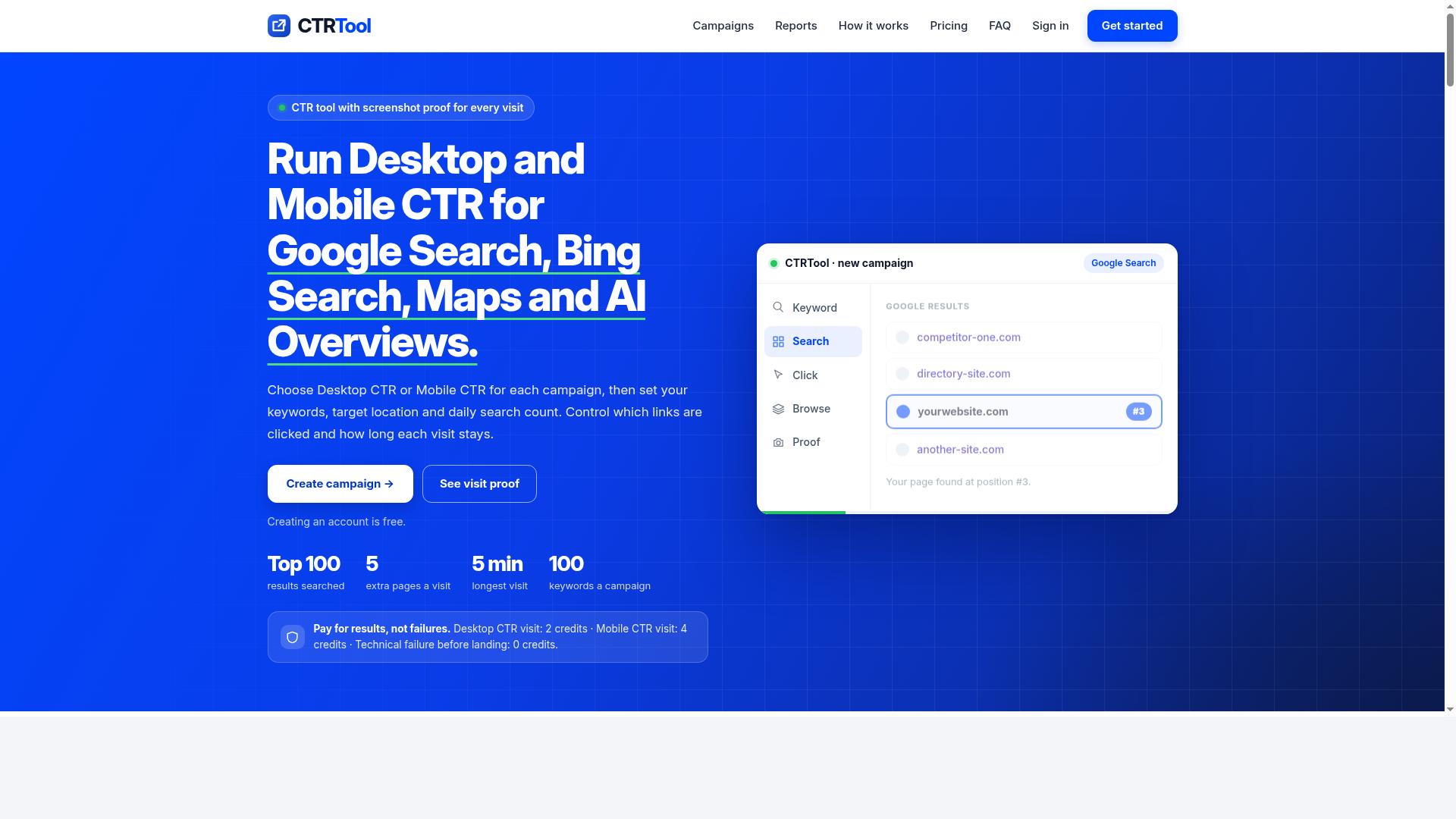
CTRTool is a SaaS platform that runs CTR campaigns on Google Search, Bing Search, Maps, and AI Overviews. It delivers automated visits designed to behave like real searchers, so the resulting click data looks like genuine engagement rather than automated noise.
At its core, the platform performs SERP behavior simulation. A campaign searches for chosen keywords, clicks through to target results, and stays on the page for a set period. That sequence of actions is what a CTR manipulation tool mimics in order to lift a page's observed click-through rate and, in turn, support its organic search rankings.
Users configure each campaign by selecting Desktop CTR or Mobile CTR, then setting keywords, target location, and daily search count. They also control which links get clicked and how long each visit stays. Every visit is backed by screenshot proof, so results can be reviewed rather than taken on trust.
It is worth being clear about what the platform does and does not promise. The CTRTool site states plainly that automated visits do not guarantee rankings. The tool supplies the controlled click activity. How search engines weigh that activity is a separate matter, and no responsible tool can promise a fixed outcome.
Who CTRTool Serves: SEO Practitioners and Agencies
CTRTool is built for SEO practitioners and agencies running CTR campaigns for their own or client websites across Google Search, Bing Search, Google Maps, and AI Overviews. These are users who already understand keyword targeting and ranking signals and want a repeatable way to act on click-through rate.
Agencies managing multiple campaigns benefit most from the per-campaign controls. Each project can have its own keywords, location, device type, and daily search volume, which keeps client work separated and easier to track. The screenshot proof per visit also gives practitioners something concrete to review when reporting on activity.
Common use cases include:
- Supporting client rankings with controlled click activity on target keywords
- Testing how SERP behavior and click patterns play out across locations and devices
- Scaling CTR efforts across several properties without manual clicking
- Running campaigns on tier links, PBNs, and test properties, as the site's guidance mentions
The audience is deliberately narrow. CTRTool is not aimed at casual users or beginners looking for general SEO advice. It serves people who already run campaigns and need a tool that executes them at volume with clear configuration and documented visits.
For practitioners weighing a CTR manipulation tool for high-volume bot traffic, CTRTool fits the profile of a focused platform: defined inputs, device choice, geotargeted search counts, dwell control, and proof of each visit. It is a legitimate SaaS product serving a specific professional need, with honest limits stated up front.
What to Look for in a CTR Manipulation Tool for High-Volume Bot Traffic
When evaluating a CTR manipulation tool for high-volume bot traffic, focus on proof, capacity, failure handling, and platform coverage to ensure reliable campaigns. At scale, small weaknesses compound quickly. A tool that works for a handful of daily visits may fall apart when you push thousands through anti-fraud systems.
High-volume campaigns stress every part of a tool: proxy rotation, browser fingerprinting, session management, and request rate control. Each of these must hold up under load, or the traffic pattern starts to look artificial and gets filtered.
The four criteria below form a practical checklist. They help you separate tools built for genuine volume from those that only perform well in small tests. Use them to compare options before committing budget to any high-volume campaign.
Proof and Verification at Volume
At high volumes, verifying each visit with screenshot proof and full visit paths is essential to confirm that bot traffic mimics human behavior. Without evidence, you cannot tell whether clicks landed on the right result or bounced off a landing page.
Look for tools that capture search page screenshots and landing page screenshots for each visit. Full visit paths should show the query entered, the result clicked, and the pages viewed afterward. This trail is the clearest sign of genuine SERP behavior simulation.
Position tracking matters too. A credible tool records where the target page appeared in the results when the click happened. That data lets you confirm the campaign is influencing the right rankings rather than sending traffic to an irrelevant listing.
Verification also supports human-like clicking checks. Review whether dwell time, scroll depth, and randomized intervals appear in the reported paths. If the proof is thin or sampled only occasionally, treat the volume claims with caution.
Campaign Capacity and Credit Efficiency
Campaign capacity and credit efficiency determine how many high-volume bot traffic visits a tool can deliver while maintaining request rate control and concurrency limits. These two factors decide whether a campaign scales smoothly or stalls partway through.
Start with the basics: credits per visit, daily goals, and concurrency limits. A low credit cost per visit means more clicks for the same budget, but only if the visits are real and verified. Compare cost per visit across tools rather than headline credit totals.
Traffic throttling deserves close attention. Tools that spread visits across randomized intervals and rotate residential proxies with genuine IP diversity are less likely to trip anti-fraud systems. Hard bursts of datacenter proxies tend to get filtered.
- Credits consumed per visit, and whether failed visits are charged
- Daily goal ceilings and how quickly they can be raised
- Concurrency limits and how the tool queues requests
- Throttling options for pacing clicks across hours or days
- Support for geotargeting, device emulation, and mobile versus desktop traffic
Assess scalability by asking how the tool behaves when you double or triple volume. A well-built system keeps request rate control steady and maintains IP diversity as load increases.
Technical Failure Handling and Fair Billing
Robust technical failure handling ensures that failed visits are not billed, maintaining fair billing practices. At high volume, some failures are inevitable, so how a tool handles them matters as much as how often it succeeds.
Ask how the tool retries failed visits. Automatic retries with fresh proxy rotation and new browser fingerprints usually recover more visits than simple re-queues. Transparent billing statements should show which visits succeeded, which failed, and which were refunded.
CAPTCHA and bot detection are the most common failure points. A tool that documents its approach to user-agent spoofing, cookie handling, referrer spoofing, and headless browser detection is easier to trust than one that stays silent.
Fair billing protects your budget on large campaigns. Confirm in writing that failed or filtered visits are credited back, and check whether refunds happen automatically or require a manual request. Clear policies here signal a tool built for sustained, high-volume use.
Coverage Across Google, Bing, Maps and AI Overviews
A capable CTR manipulation tool should support campaigns across Google Search, Bing Search, Google Maps, and AI Overviews, with options for geotargeting and device emulation. Coverage breadth matters because search behavior is fragmented. A tool that only reaches one engine leaves gaps in the click-through rate signals that influence organic search rankings.
Google Search remains the largest surface, but Bing carries meaningful share in many regions and on desktop. Google Maps drives local discovery, where clicks and interactions shape visibility for service and retail queries. AI Overviews are newer and increasingly visible, so a tool that can simulate engagement there keeps campaigns aligned with how results are actually presented.
When comparing tools, ask whether each platform is supported natively or as an afterthought. Native support usually means the tool understands how each surface renders results and where clicks land.
Why Multi-Platform Support Matters for High-Volume Bot Traffic
High-volume bot traffic amplifies both strengths and weaknesses. If a tool spreads clicks across engines without matching each platform's layout, the traffic looks unnatural and bot detection evasion becomes harder. Consistent SERP behavior simulation on every supported engine is the safer path.
Platform coverage also protects against concentration risk. A campaign built only on Google is easy to spot as a single-source spike. Distributing activity across Google, Bing, Maps, and AI Overviews produces a more varied footprint that anti-fraud systems are less likely to flag.
Check that volume limits apply per platform, not just overall. A tool might advertise large capacity while throttling each engine separately, which matters for traffic throttling and request rate control.
Geotargeting and Location Accuracy
Geotargeting lets a tool place clicks from specific cities, regions, or countries. For local campaigns, this is essential. A business targeting one metro area gains little from clicks that originate elsewhere, and mismatched locations can distort the data you use to judge results.
Look for granular location selection rather than country-level toggles. The best tools let you match click origins to the markets you actually serve, and they pair location with residential proxies so the source IP aligns with the chosen area. Datacenter proxies may be cheaper but often sit in known ranges that anti-fraud systems recognize quickly.
Ask how location data stays consistent across a session. If the IP says one city and the browser fingerprint suggests another, the mismatch undermines the whole campaign.
Device Emulation for Mobile and Desktop Traffic
Search results differ between mobile and desktop, and so do click patterns. A tool needs device emulation that covers both, with accurate user-agent spoofing and browser fingerprinting for each. Mobile traffic often dominates local and consumer queries, while desktop traffic skews toward research-heavy searches.
Emulation should extend beyond the user agent string. Screen size, touch support, and rendering behavior all contribute to a believable session. Weak emulation is one of the easiest things for bot detection systems to catch.
Match device mix to the campaign's target audience. A tool that lets you weight mobile versus desktop traffic gives you control over how natural the overall pattern looks.
Search Type Support and SERP Behavior Simulation
Different search types produce different click paths. Web results, image results, local packs, shopping listings, and AI Overviews each present links in distinct positions. A tool should recognize these layouts and simulate realistic human-like clicking within each one.
Support for varied search types also supports dwell time and bounce rate reduction goals. Clicks that land and then leave immediately look suspicious. Tools that model session management, cookie handling, and referrer spoofing produce more credible engagement.
- Web and organic result clicking
- Local pack and Maps interactions
- AI Overview engagement
- Image and shopping result support
Confirm which search types are covered before committing to a high-volume plan. A tool that handles only standard web results will limit how varied and convincing your campaigns can be.
How CTRTool Measures Up on Each Criterion
CTRTool addresses the key criteria for high-volume bot traffic through screenshot proof, scalable credits, and pay-for-results billing. It is a SaaS platform built for CTR campaigns across Google Search, Bing Search, Maps, and AI Overviews, with a stated focus on proof for every visit.
That combination matters because high-volume bot traffic fails in predictable ways. Buyers worry about unverifiable clicks, runaway costs from failed visits, and detection risk when request rates spike. CTRTool's feature set maps directly onto each of those concerns.
The following subsections examine the tool against three criteria in turn. First, proof that visits actually happened and followed a realistic path. Second, capacity to run large campaigns without hitting ceilings. Third, a billing model and location targeting that keep spend tied to results.
For teams evaluating a CTR manipulation tool, this breakdown shows where the platform is strong and which settings deserve attention during setup.
Screenshot Proof and Full Visit Paths
CTRTool provides screenshot proof for every visit, including separate search and landing screenshots, along with full visit paths and keyword position tracking over time. The search screenshot captures the result page, while the landing screenshot confirms the destination page loaded.
This matters for SERP behavior simulation. A click without evidence is hard to audit at scale, especially when campaigns run across many keywords. Two distinct proof images per visit give campaign managers a verifiable record rather than a bare click count.
Full visit paths extend the picture beyond the first click. Campaigns can include up to five additional internal pages per visit, with visits lasting up to five minutes total. That structure supports realistic dwell time and reduces the risk of a visit looking like a one-page bounce.
Position tracking adds a longitudinal layer. Reports show search positions, Maps listing order, and AI citation order over time, so operators can see whether rankings shift alongside campaign activity.
- Search screenshot for the result page where the click occurred
- Landing screenshot confirming the destination page
- Full visit paths covering internal pages and total visit duration
- Position history for Search, Maps listing order, and AI citations
For high-volume work, this proof chain is the difference between a campaign you can audit and one you simply trust.
High-Volume Capacity: Credits, Campaigns and Daily Goals
CTRTool's credit-based system supports high-volume campaigns with configurable daily goals and traffic timing to manage request rates. One credit balance is shared across all campaign types, websites, and keywords, which simplifies budgeting when several campaigns run at once.
Capacity is generous by design. Accounts support up to 100 campaigns with 100 keywords each, and search depth reaches the top 100 results. Each campaign can run on Desktop or Mobile traffic, with delivery through Desktop Chrome windows and real Android phone sessions matched to the target location through managed proxy routes.
Daily goals reset at 00:00 UTC. Timing can be set to run immediately, spread out, or with defined gaps, alongside chosen days, hours, and time zone. That scheduling control is central to request rate control: instead of dumping clicks in a burst, operators can pace them across the day.
Combined with realistic dwell time, these settings support human-like clicking patterns at volume rather than a detectable spike.
Unused credits roll over while a subscription stays active, so slow months do not waste budget. For teams scaling up, the practical levers are campaign count, keyword breadth, and daily pacing, all adjustable without changing plans.
Pay-for-Results Credits and Location Targeting
CTRTool uses a pay-for-results credit system where credits are consumed only for successful visits, and campaigns can target specific countries, states, and cities. Technical failures before landing are not charged, and visits that cannot verify the requested location use no credits.
That billing structure protects high-volume budgets. When you run thousands of visits, failed attempts can quietly inflate costs. Tying charges to verified, completed visits keeps spend aligned with delivered work.
Location targeting is granular. Campaigns can specify a country and optionally a state and city, or select Any country to draw from a mix of supported locations. Maps campaigns add city targeting for finding business listings, and AI Overview campaigns track citation order for the chosen source links.
Geotargeting matters because search results vary by location. A campaign aimed at city-level rankings needs visits that appear to originate from that area, routed through proxies matched to the target. Without that alignment, clicks may not reflect the audience the campaign is trying to influence.
Campaign setup also covers target URL, internal page URLs, link text, click order, and scrolling time, so each visit can follow a defined path. Taken together, the pay-for-results model and location controls make CTRTool a credible fit for high-volume bot traffic where proof, capacity, and cost control all count.
Pricing and Plans for High-Volume Campaigns
CTRTool offers monthly plans starting at $59 for 2,000 credits, scaling to $125 for 5,000 credits, with credit costs varying by campaign type (desktop vs. mobile). For teams running high-volume bot traffic, the plan structure matters as much as the feature list, because credits are the real currency of every campaign.
Each visit type draws a fixed number of credits, so your monthly budget maps directly to how many sessions you can run. That predictability is what separates a usable CTR manipulation tool from one that leaves you guessing at the end of the month.
The four published tiers cover a wide range of campaign sizes:
| Plan | Price (USD/month) | Credits | Desktop Visits | Mobile Visits |
|---|---|---|---|---|
| Starter | $59 | 2,000 | Up to 1,000 | Up to 500 |
| Growth (Recommended) | $125 | 5,000 | Up to 2,500 | Up to 1,250 |
| Scale | $399 | 20,000 | Up to 10,000 | Up to 5,000 |
| Agency | $699 | 40,000 | Up to 20,000 | Up to 10,000 |
CTRTool marks the Growth plan as Recommended, which makes sense for mid-sized campaigns that need steady daily volume without committing to an agency budget. The Scale and Agency tiers exist for operations that push tens of thousands of visits per month.
Credit consumption is straightforward and worth memorizing before you commit to a tier:
- Desktop CTR visit: 2 credits
- Mobile CTR visit: 4 credits
- Verified search without a match: 1 credit
- Technical failure before landing: 0 credits
Because mobile traffic costs twice as much as desktop, a campaign heavy on device emulation for smartphones will burn through credits faster. Plan your desktop-to-mobile ratio before choosing a tier, since mobile traffic is often where high-volume bot traffic needs the most coverage.
Two billing details matter for long campaigns. Unused credits roll over while your subscription stays active, but they expire when a cancellation takes effect, so there is no reason to let a balance sit idle after you stop. Creating an account is free, and custom development carries a separate one-time fee agreed in advance.
CTRTool also displays limited launch pricing with a note that prices rise 30% on November 15, so locking in a tier early protects your budget for high-volume work. To choose a plan, estimate your monthly visit count, weight mobile visits at double credit cost, and pick the smallest tier that covers the total with some headroom. For most high-volume campaigns, that lands on Growth or Scale, with Agency reserved for operations running multiple properties at once.
Who Should Use CTRTool
CTRTool is ideal for SEO practitioners and agencies managing CTR campaigns for multiple clients or high-value websites across Google, Bing, Maps, and AI Overviews. The platform is built for people who treat click-through rate as a deliberate ranking input rather than a side effect.
If you run a single small blog, you are probably not the core user. The tool fits operations where campaign volume and channel variety are the daily reality, and where manual clicking simply cannot keep pace.
Three broad profiles benefit most from a dedicated CTR manipulation tool. Each shares the same need: control over how traffic is delivered at scale.
- SEO professionals working competitive keywords where organic search rankings move slowly and every engagement signal counts.
- Agencies running campaigns across several client properties at once and needing consistent delivery between accounts.
- Businesses with high-value websites that justify sustained testing of SERP behavior rather than one-off experiments.
For SEO practitioners, the appeal is precision over guesswork. Competitive keywords demand steady, believable engagement patterns, and a purpose-built tool gives you control over pacing instead of raw volume alone.
Agencies face a different pressure: consistency. Scaling client campaigns means repeating the same setup across domains without letting quality drift, and a shared platform makes that repeatable.
Businesses with large sites often want to test SERP behavior itself. How searchers respond to a listing, which queries deserve attention, and how rankings shift over time all become measurable when you can direct traffic deliberately.
The brand's own guidance references tier links, PBNs, and test properties, which tells you the expected user already understands link architecture and test environments. This is not an entry-level audience.
Channel coverage matters too. Running campaigns across Google Search, Bing Search, Google Maps, and AI Overviews from one place suits teams that cannot afford separate workflows per surface.
In short, CTRTool suits anyone who needs repeatable, controllable CTR campaigns rather than scattered manual effort. That focus is what separates it from generic traffic tools.
Final Verdict
CTRTool stands out as a robust CTR manipulation tool for high-volume bot traffic, offering screenshot proof, scalable credits, and multi-platform coverage, though it may be overkill for small-scale users. For teams running serious campaigns, those strengths line up with what matters most: verifiable delivery, capacity that scales, and reach across the platforms where organic search rankings are won.
The core argument for CTRTool is simple. A high-volume campaign is only useful if you can confirm the clicks actually happened, and the tool's screenshot proof addresses that directly. Combined with scalable credits and a pay-for-results model, spending stays tied to delivered activity rather than flat subscriptions.
Coverage matters just as much when traffic volume rises. Multi-platform support lets a single campaign span the search surfaces your audience uses, instead of forcing separate setups per engine. That reduces overhead and keeps click-through rate signals consistent across targets.
No tool is a perfect fit for everyone, and the honest limitations are worth naming:
- Cost for small users: high-volume capacity is built for scale, so light users may find the model more than their budget needs.
- Learning curve: campaign configuration, proxy choices, and throttling settings reward operators who take time to understand them.
- Overkill risk: a site running a few dozen clicks a day does not need the same infrastructure as an agency managing many campaigns.
These are trade-offs of capability, not flaws. A tool that handles proxy rotation, IP diversity, and request rate control at volume will always ask more of the operator than a lightweight clicker.
For support questions, the verified contact channel is vaibhav@autoblogging.ai, listed in the site FAQ. No phone number or physical address is published, so email is the practical route for pre-sale or account questions.
Who should choose CTRTool? The strongest fit is agencies, SEO teams, and affiliate operators running sustained campaigns where proof of delivery and volume both matter. If your goal is measurable movement in organic search rankings backed by evidence you can show a client, this tool is built for that job.
Smaller users with modest targets should weigh the cost against their expected volume before committing. For everyone operating at scale, the verdict is clear: CTRTool is a credible, purpose-built choice for high-volume bot traffic, and the combination of screenshot proof, scalable credits, and multi-platform coverage makes it a sound investment.
Frequently Asked Questions
What should a high-volume CTR tool prove for every visit?
For high-volume bot traffic, proof matters more than raw click counts, because you need to verify each visit actually happened as intended. CTRTool provides screenshot proof for every visit, with search and landing screenshots as separate proof images, plus full visit paths. That lets you audit campaigns at scale instead of trusting aggregate numbers.
Does CTRTool support both desktop and mobile bot traffic?
Yes. You choose Desktop CTR or Mobile CTR per campaign, so you can match the device mix your keywords actually receive. CTRTool runs campaigns for Google Search, Bing Search, Maps and AI Overviews, and you set keywords and target location for each campaign.
How do credits work for large campaigns?
CTRTool uses pay-for-results credits rather than flat fees. Monthly plans are priced in USD: Starter is $59/month for 2,000 credits (up to 1,000 Desktop CTR visits or 500 Mobile CTR visits), and Growth is $125/month for 5,000 credits (up to 2,500 Desktop or 1,250 Mobile visits). Check the site for the full plan lineup before scaling volume.
What eligibility rules affect high-volume campaigns?
Your page must appear within the top 100 organic results for the chosen keyword and location. Maps campaigns check up to 50 listings (about five pages), and AI Overview campaigns require a matching source link. Confirm these conditions before launching large volumes so visits aren't wasted.
Can I target specific locations for bot traffic?
Yes. CTRTool is a global online service, and campaigns can target a chosen country with an optional state and city, or "Any country" to use a mix of supported locations. No country restrictions are stated, so you can align traffic with the markets you're ranking in.
How do I get help before committing to high volume?
CTRTool lists support via email at vaibhav@autoblogging.ai, along with Support, Terms of use and Legal notices pages on the site. For agencies running client campaigns, it's worth confirming plan limits and campaign setup with support before scaling. Note that no phone number or opening hours are stated.